Live demo

Job software for mobile tyre fitters

Customers message you on WhatsApp. TyreStack reads the message, builds the job, sends the quote, books it onto the right van and shows the fitter where to go and tracks the payment.

  • WhatsApp enquiries to jobs
  • One-tap quotes
  • Van schedule and map
  • Fitter phone view
  • Supplier stock and ordering
  • Payment tracking and bank reconciliation
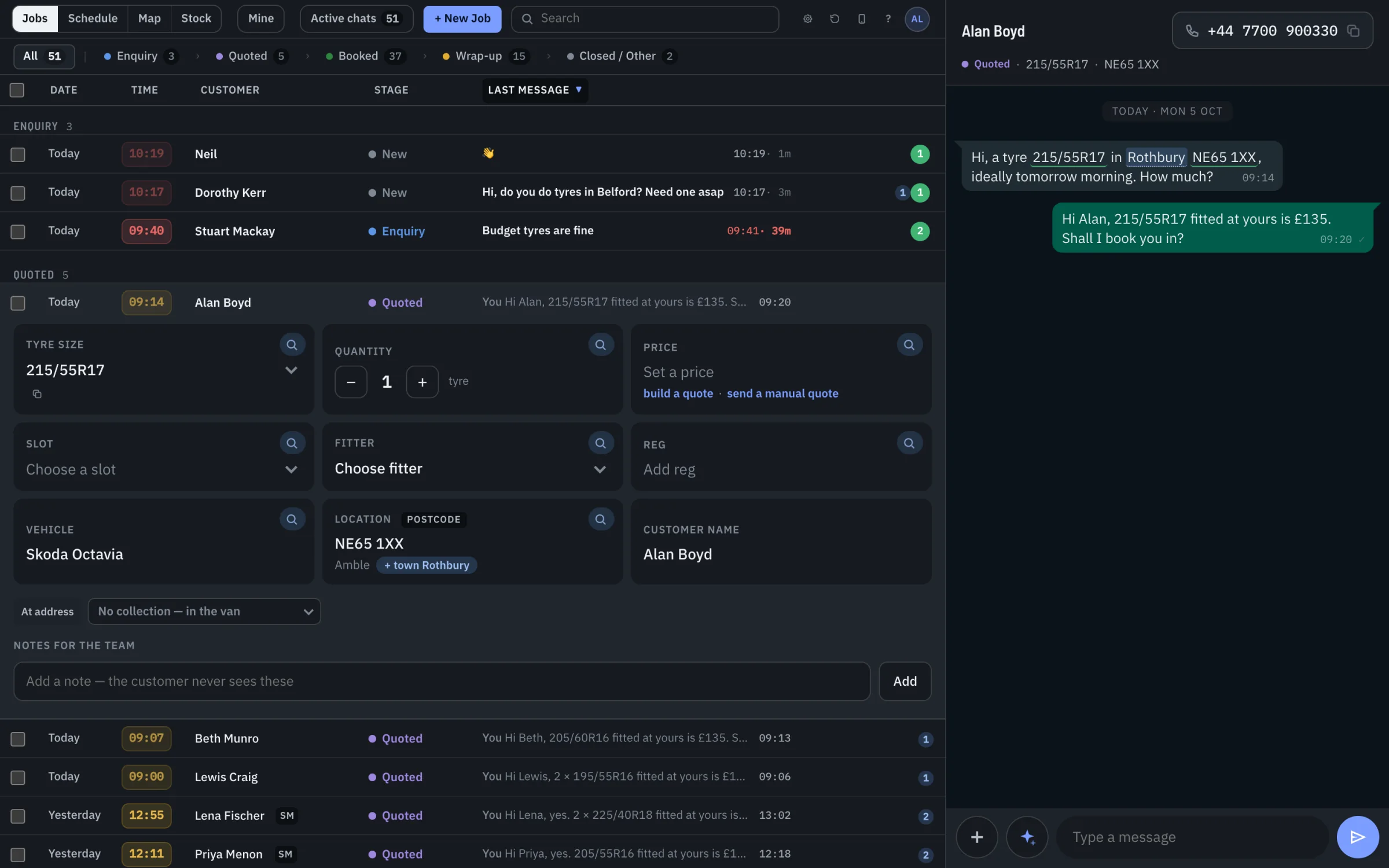
The TyreStack desk: a jobs list on the left, with a job card filled in from the customer's WhatsApp message, and the chat on the right.
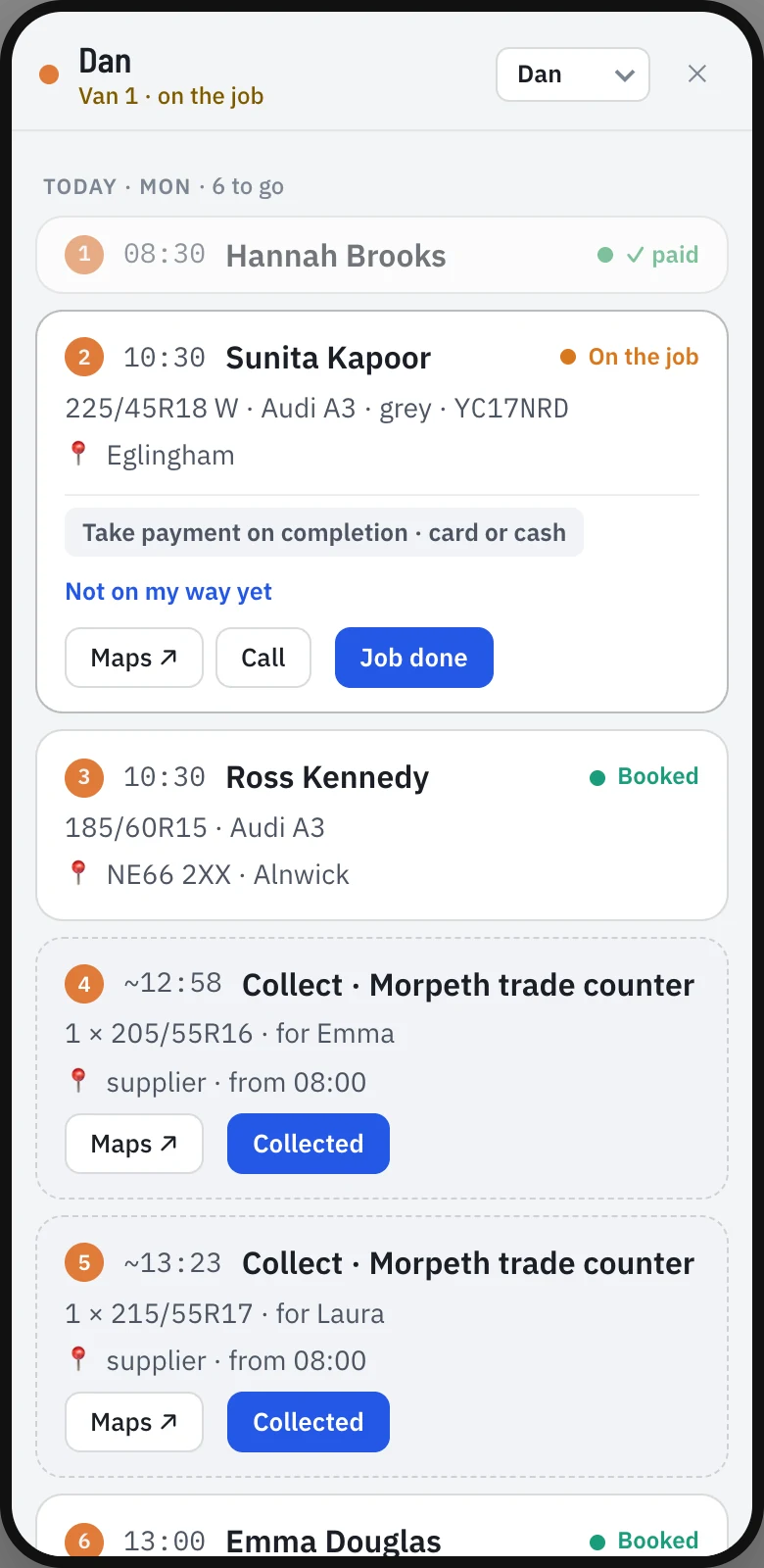
The fitter's phone view: today's jobs in order, with Maps, Call and Job done buttons.
How it works

From first message to job done, in one place.

Most fitters run jobs from WhatsApp, a diary and memory. TyreStack puts all of it on one screen.

  1. Customer messages you

    Someone WhatsApps asking for a tyre. The chat appears in your jobs list.

  2. The job fills itself in

    Tyre size, vehicle, postcode and name are picked out of the message.

  3. You send the quote

    Pick Economy, Mid-range or Premium from your price card. One tap to send.

  4. It goes on a van

    Drag the job onto a fitter's day. Travel time between jobs is shown.

  5. The fitter does it

    Their phone shows the next job, the address, Call and Job done.

  6. Payment is matched

    The payment is recorded against the job and matched to the money in your bank.

Jobs

Every enquiry becomes a job

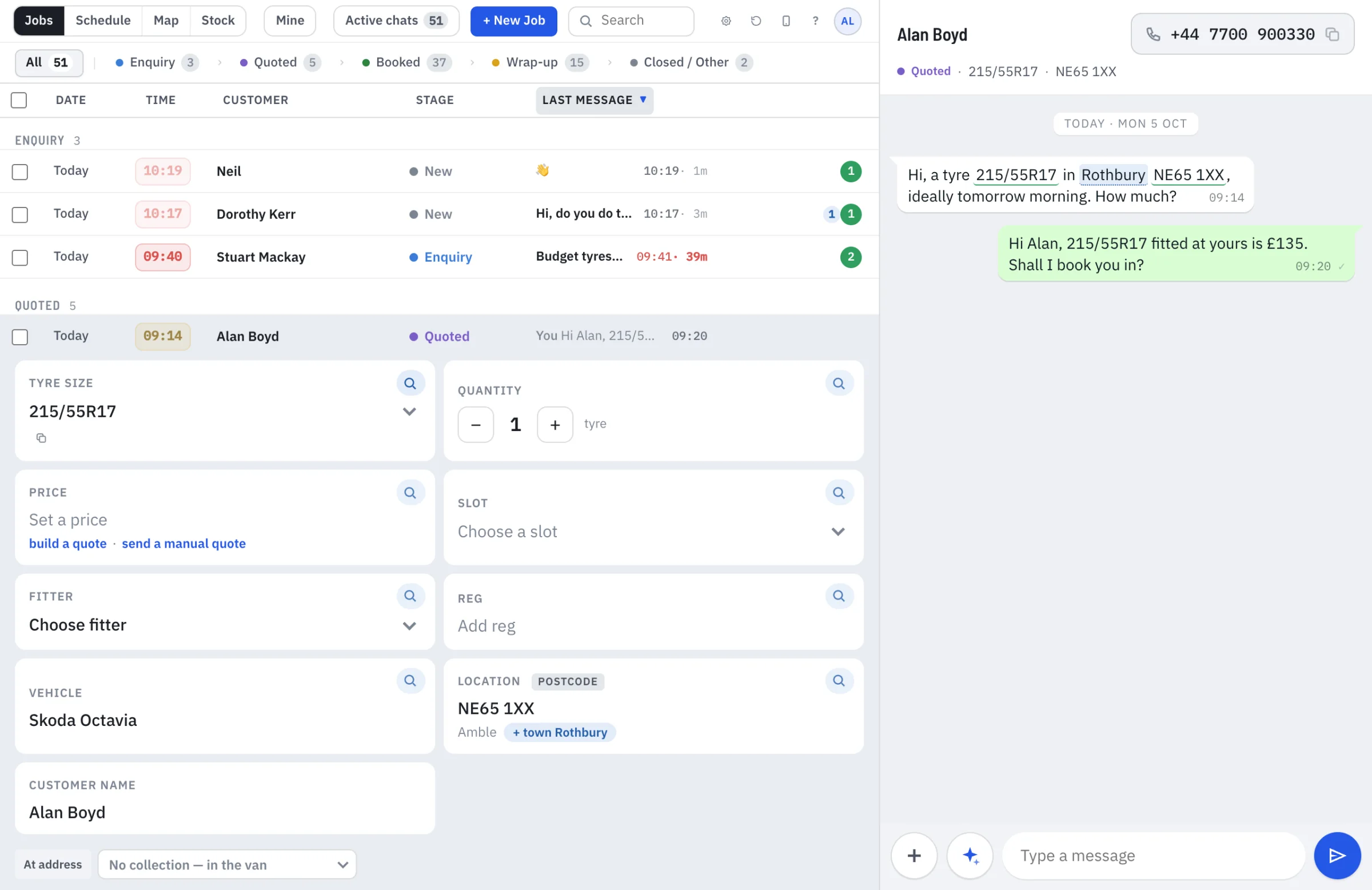
Your jobs list is built from your WhatsApp chats. Open one and the job card is already filled in: tyre size, quantity, vehicle, postcode and customer name. The same details are highlighted in the chat, so you can see where each came from. Fix anything that's wrong and carry on.

  • Track every job from enquiry to paid: Enquiry, Quoted, Booked, Wrap-up, Closed
  • Notes for your team that the customer never sees
  • Take over a job from a colleague
  • Search across every chat and job
Jobs list with Alan Boyd's job open: tyre size 215/55R17, vehicle Skoda Octavia and postcode filled in from his WhatsApp message.
Quotes

Send a quote in one tap

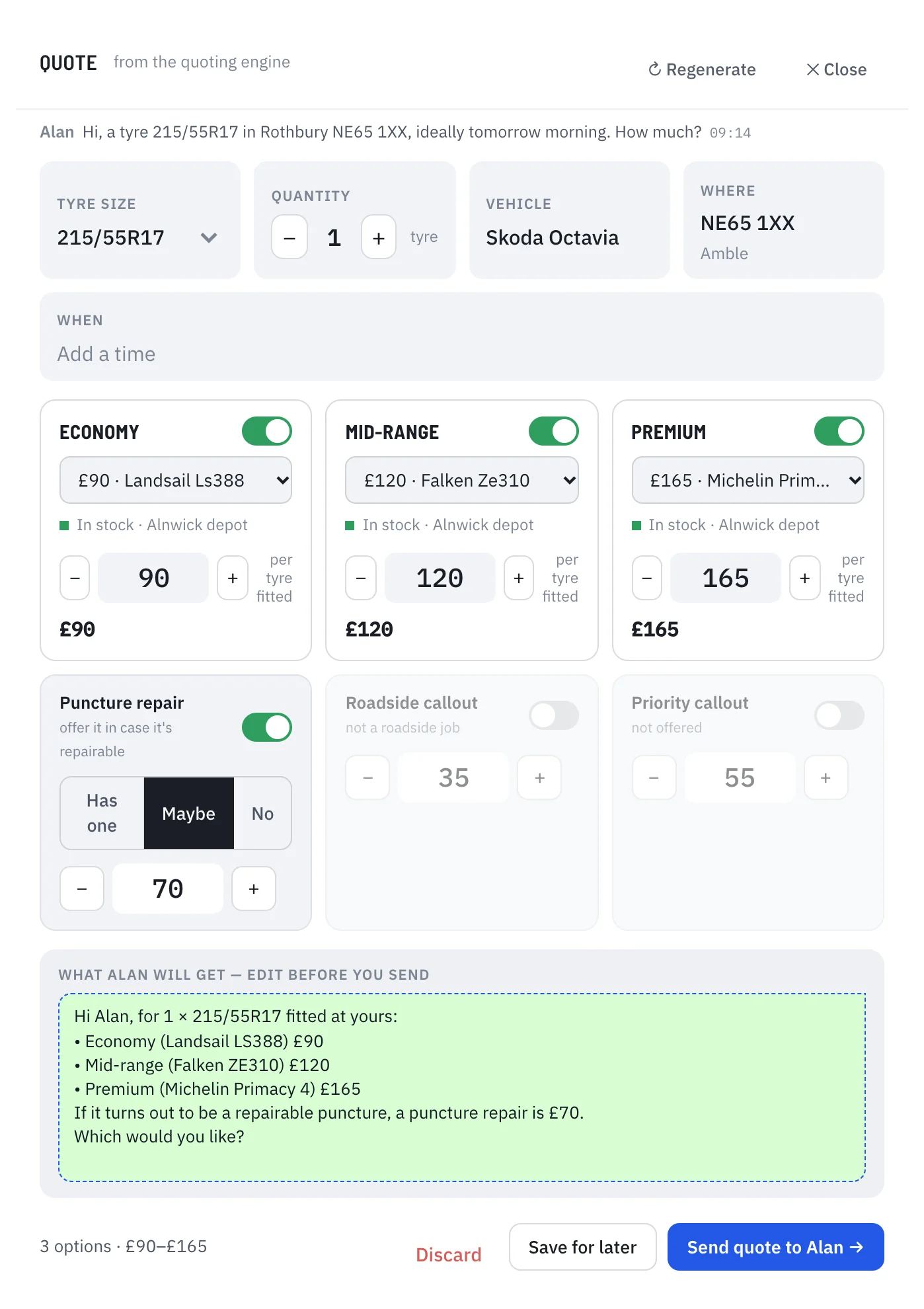
The quote builder prices the job from your own price card: Economy, Mid-range and Premium, fitted. The reply is written for you. Edit it if you want, then send it.

  • Switch any option on or off
  • Change a price for one customer without touching your price card
  • Add a puncture repair price in case the tyre turns out to be repairable
  • Roadside and priority callout prices are built in
The quote builder: Economy £90, Mid-range £120 and Premium £165 fitted, with the message the customer will receive underneath.
Schedule

Put every job on the right van

Jobs waiting for a slot sit in a queue at the top, with the urgent ones marked priority. Drag one onto a fitter's line, or drag a booked job somewhere else. Travel time shows between jobs, so you can see what really fits in a day.

  • One line per fitter and van, with where they will be free
  • Fitting, collecting and travelling are shown as separate blocks
  • Browse any day this week
The schedule: a queue of jobs to place, and a timeline with one line per fitter showing jobs and travel time.
Map

See where every van is

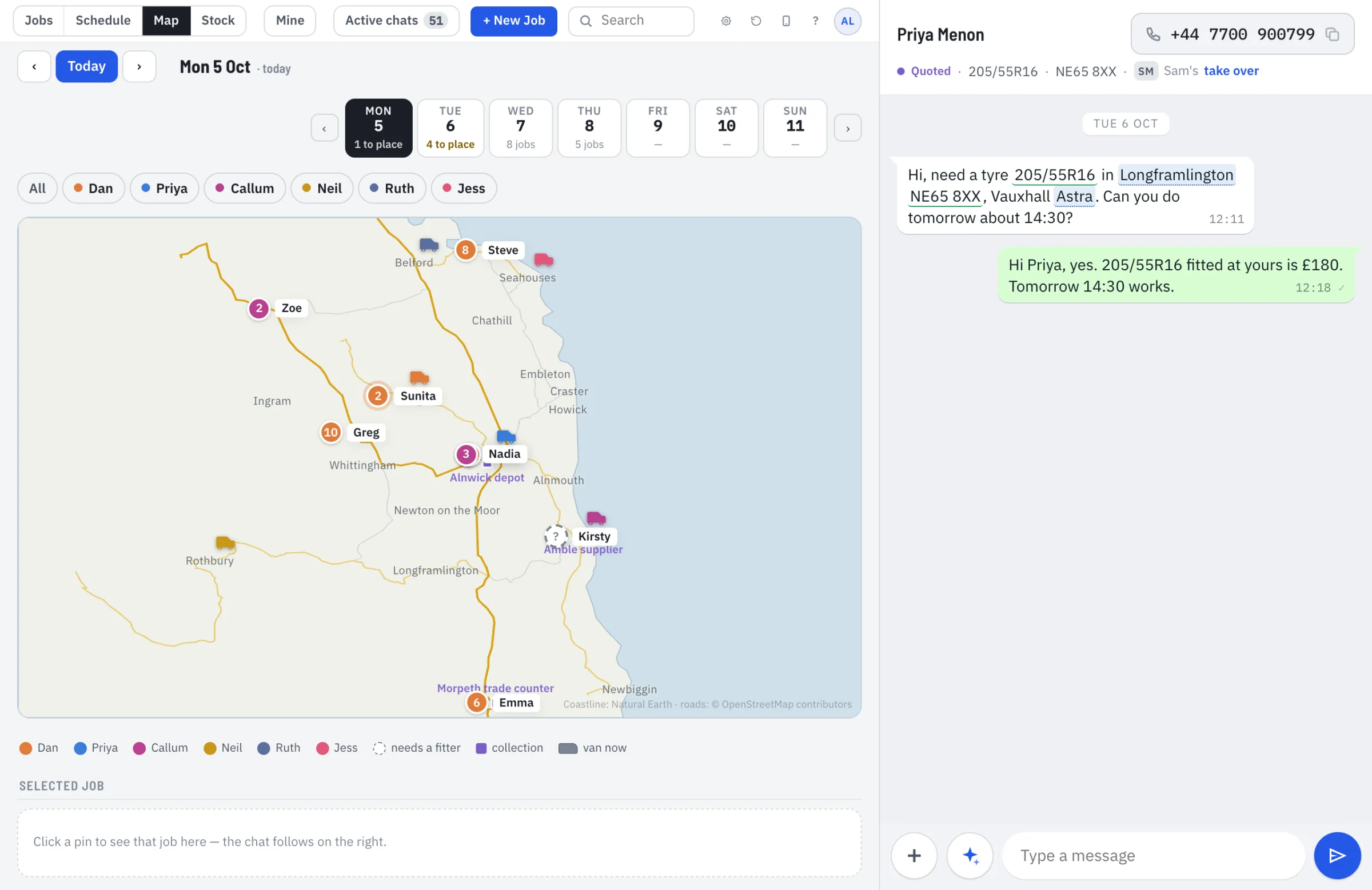
Every fitter, job and supplier stop on one map, coloured by fitter. Click a pin and its chat opens. Jobs that don't have a fitter yet are marked, so you can send the nearest van.

  • Depots and suppliers are marked
  • Filter to one fitter
  • Click a job to open its conversation
A map with each fitter's van and numbered jobs, coloured by fitter.
Fitter phone view

Fitters see their day on a phone

Each fitter gets their own list, next job first, with the address, tyre size, vehicle and reg. Maps and Call are one tap away. When the job is done, they tap Job done. Tyre pick-ups from your supplier show up as stops in the list, so nothing gets forgotten on the way.

  • A reminder to take card or cash payment
  • Mark a pick-up as collected
  • Tomorrow's jobs are listed underneath
The fitter's phone view with Dan's list for today: a finished job, a job in progress, a booked job and two supplier pick-ups.
Stock

Check stock and order tyres without leaving the job

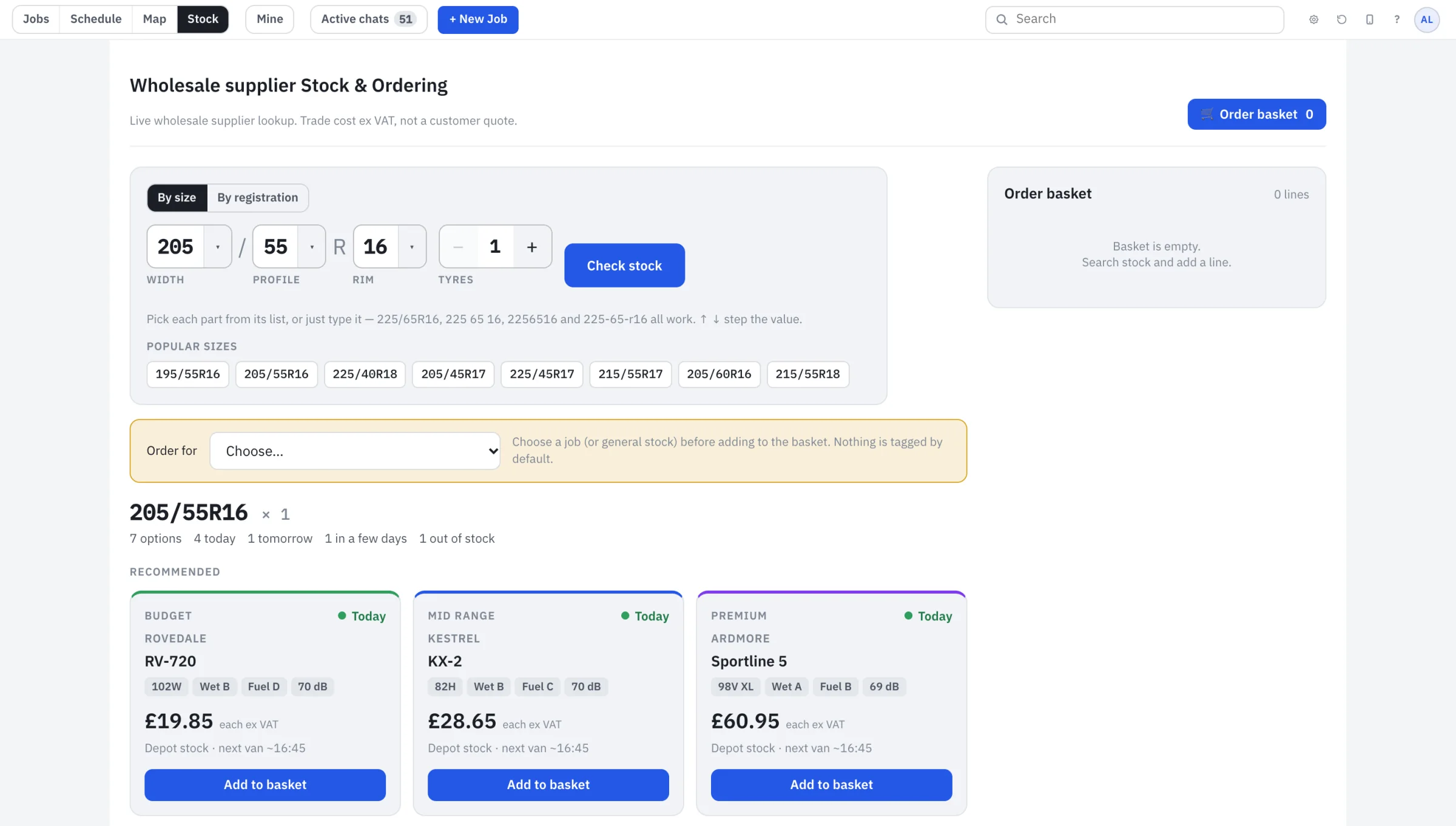
Search your wholesale supplier by tyre size or registration. You see Budget, Mid-range and Premium options with the trade price excluding VAT, and when each can reach you: same day, tomorrow or a few days. Add one to the basket and tag the order to a job.

  • Trade price shown ex VAT, kept apart from the customer's quote
  • Every order is tagged to a job
  • Quick buttons for the sizes you fit most
Stock search for 205/55R16 showing Budget and Mid-range tyres with trade prices and same-day availability.
Payments and reporting

Know who has paid, and what you are owed.

Every job carries its payment status, from the quote to the money in your bank.

Payment tracking

Each job shows whether it is awaiting payment or paid, and how: card, cash or bank transfer. Fitters record it when the job is done.

Bank reconciliation

Incoming payments are matched to jobs. Anything that does not match is flagged for you to check, so nothing slips through.

Quotes and invoices

Raised in your own accounting software from the job card, so the figures match everywhere and your books stay in one place.

Dashboards

Jobs and revenue by week, outstanding payments, where your enquiries come from and how each van is doing.

Connections

Works with the accounts you already have.

TyreStack connects to your own accounts and systems. We set each one up with you, using your own logins. You own every account and can disconnect any of them at any time.

WhatsApp Business

Your own number, connected through Meta's WhatsApp Business platform. Customers keep messaging the number they already know.

Accounting software

Quotes and invoices are created in your accounting package and linked to the job. Tell us what you use.

Your bank, read-only

A read-only connection shows incoming payments so they can be matched to jobs. It can see transactions. It cannot move money.

Google

Google Ads and your Business Profile reviews, so enquiries are tracked from the first click and your reviews show on your site.

Your tyre supplier

Your own wholesale account for live stock and trade prices.

The website

We also build the website that sends you the enquiries.

It's where many customers find you, and it feeds the same app. Every enquiry arrives with where it came from.

A page for every town you cover

So you show up when someone searches for a mobile tyre fitter in their town.

Reg-plate tyre finder

Customers type their registration and get the right tyre size. If that fails, they can photograph the sidewall or pick a size.

Call and WhatsApp on every page

Tap to call. Tap to WhatsApp, with the message already started.

Reviews and Google Ads

Google reviews on the page, with replies drafted for you to approve. Won jobs are reported back to Google Ads so it finds more customers like them.

See an example fitter website
Everything in TyreStack

The full list.

Enquiries and jobs

  • WhatsApp inbox inside the app
  • Job card filled in from each message
  • Job tracking from enquiry to paid
  • Notes for your team
  • Take over a colleague's job
  • Search every chat and job

Quotes and payments

  • One-tap quote builder from your price card
  • Quotes and invoices through your accounting software
  • Payment received tracking
  • Bank reconciliation, read-only
  • Outstanding payments at a glance

Schedule and fitters

  • Drag-and-drop schedule
  • Travel time between jobs
  • Van map
  • Fitter phone view
  • Supplier pick-ups as stops
  • Supplier stock lookup and ordering

Reports and website

  • Dashboards
  • Where every enquiry came from
  • Website with a page for every town
  • Reg-plate tyre finder
  • Google reviews and drafted replies
  • Google Ads tracking

Questions

What is TyreStack?

Job software for mobile tyre fitters, plus the website that brings you work. It turns WhatsApp enquiries into jobs, quotes, van schedules and fitter lists, and tracks each payment through to your bank.

Can I try it?

Yes. Open the demo and click through a full day: reply to a customer, send a quote, drag a job onto a van, check the map. Nothing you do in it affects anyone else.

Does it work with my WhatsApp number?

Yes. We connect your own number through Meta's official WhatsApp Business platform, so customers keep messaging the number they already use.

What do I need to connect?

Your WhatsApp Business number, your accounting software and read-only access to your business bank account. Google Ads, your Google Business Profile and your tyre wholesaler account are optional. Tell us which accounting software and bank you use and we will confirm the connection before you start. We set up each one with you.

Can TyreStack move money from my bank?

No. The bank connection is read-only. It can see transactions so payments can be matched to jobs. It cannot make payments or change anything on your account.

What does it cost?

It depends on how many vans you run and which parts you use. Tell us about your business and we will give you a price in writing.

Where is my customers' data kept?

In the UK, in a database that keeps each fitter's data separate from every other fitter's. It is yours, and we hand it over if you leave. We do not put your customers' details into AI tools.

Do I need to be technical?

No. Send us your prices, the areas you cover and your hours. We set it up.

Is it only for big firms?

No. It is built for van-based fitters, from one van upwards.

Will the website get me to the top of Google?

We can't promise a ranking, and nobody honest can. We build a page for each area you cover, add the markup Google reads, show your reviews, and report where your enquiries come from.

See it running

Open the demo and click through a day: reply to a customer, send a quote, drag a job onto a van, check the map.